NET. MAUI LOGIN SHELL APPS NAVIGATION
kali ini saya akan memberikan source code untuk membuat navigasi login net. maui, langsungsaja, berikut tampilan login:
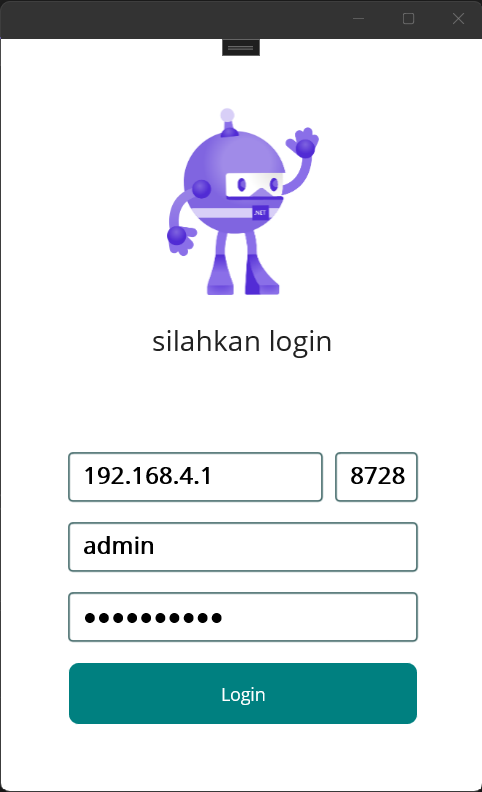
berikut tampilan setelah login

berikut tampilan dashboard
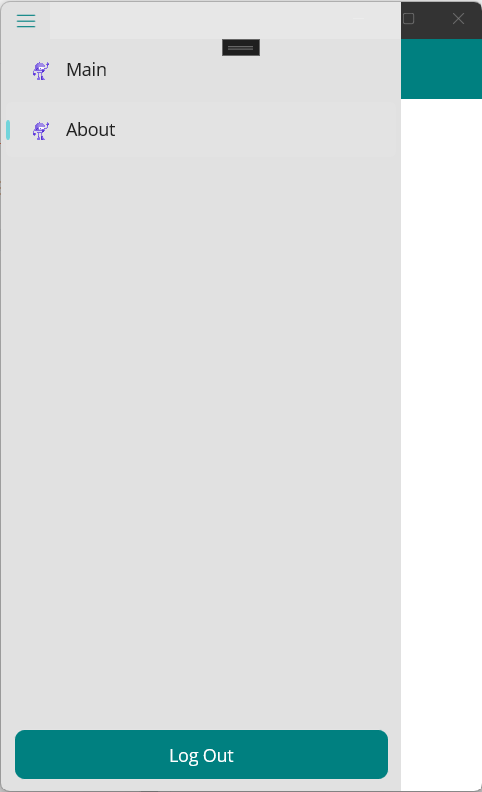
berikut tampilan navigasi.
untuk source codenya sebagai berikut;
file App.xaml
<?xml version = "1.0" encoding = "UTF-8" ?>
<Application xmlns="http://schemas.microsoft.com/dotnet/2021/maui"
             xmlns:x="http://schemas.microsoft.com/winfx/2009/xaml"
             xmlns:local="clr-namespace:My_Template"
             x:Class="My_Template.App" UserAppTheme="Light">
    <Application.Resources>
        <ResourceDictionary>
            <ResourceDictionary.MergedDictionaries>
                <ResourceDictionary Source="Resources/Styles/Colors.xaml" />
                <ResourceDictionary Source="Resources/Styles/Styles.xaml" />
            </ResourceDictionary.MergedDictionaries>
        </ResourceDictionary>
    </Application.Resources>
</Application>
file App.xaml.cs
namespace My_Template;
#if WINDOWS
using Microsoft.UI;
using Microsoft.UI.Windowing;
using Windows.Graphics;
#endif
public partial class App : Application
{
    const int WindowWidth = 500;
    const int WindowHeight = 800;
    public App()
	{
		InitializeComponent();
        Microsoft.Maui.Handlers.WindowHandler.Mapper.AppendToMapping(nameof(IWindow), (handler, view) =>
        {
#if WINDOWS
            var mauiWindow = handler.VirtualView;
            var nativeWindow = handler.PlatformView;
            nativeWindow.Activate();
            IntPtr windowHandle = WinRT.Interop.WindowNative.GetWindowHandle(nativeWindow);
            WindowId windowId = Microsoft.UI.Win32Interop.GetWindowIdFromWindow(windowHandle);
            AppWindow appWindow = Microsoft.UI.Windowing.AppWindow.GetFromWindowId(windowId);
            appWindow.Resize(new SizeInt32(WindowWidth, WindowHeight));
#endif
        });
        MainPage = new AppShell();
	}
}
file AppShell.xaml
<?xml version="1.0" encoding="UTF-8" ?>
<Shell
    x:Class="My_Template.AppShell"
    xmlns="http://schemas.microsoft.com/dotnet/2021/maui"
    xmlns:x="http://schemas.microsoft.com/winfx/2009/xaml"
    xmlns:local="clr-namespace:My_Template"
    Shell.FlyoutBehavior="Disabled" >

    <Shell.TabBarIsVisible>false</Shell.TabBarIsVisible>
    <Shell.FlyoutBackgroundColor>#E1E1E1</Shell.FlyoutBackgroundColor>
    <ShellContent
        Title="Login"
        Shell.FlyoutItemIsVisible="False"
        ContentTemplate="{DataTemplate local:LoginPage}"
        Route="LoginPage" />

    <FlyoutItem
        Title="App"
        Route="App"
        FlyoutDisplayOptions="AsMultipleItems">

        <ShellContent
            Title="Main"
            Icon="dotnet_bot.png"
            ContentTemplate="{DataTemplate local:MainPage}"
            Route="MainPage" />

        <ShellContent
            Title="About"
            Icon="dotnet_bot.png"
            ContentTemplate="{DataTemplate local:AboutPage}"
            Route="AboutPage" />

    </FlyoutItem>
    <Shell.FlyoutFooter>
        <StackLayout Padding="10,10,10,10">
            <Button Text="Log Out" Clicked="Logout_Click"/>
        </StackLayout>

    </Shell.FlyoutFooter>
</Shell>
file AppShell.xaml.cs
namespace My_Template;

public partial class AppShell : Shell
{
	public AppShell()
	{
		InitializeComponent();
	}

    private void Logout_Click(object sender, EventArgs e)
    {
        Shell.Current.FlyoutBehavior = FlyoutBehavior.Disabled;
        Shell.Current.GoToAsync("//LoginPage");
    }
}
file LoginPage.xaml
<?xml version="1.0" encoding="utf-8" ?>
<ContentPage xmlns="http://schemas.microsoft.com/dotnet/2021/maui"
             xmlns:x="http://schemas.microsoft.com/winfx/2009/xaml"
             x:Class="My_Template.LoginPage"
             Title="LoginPage">
    <Shell.TabBarIsVisible>false</Shell.TabBarIsVisible>
    <Shell.NavBarIsVisible>false</Shell.NavBarIsVisible>
    <Shell.FlyoutBehavior>Disabled</Shell.FlyoutBehavior>

    <ScrollView>

        <VerticalStackLayout
                Spacing="15"
                Padding="10,10,10,10" Margin="10,10,10,10" WidthRequest="300"
                VerticalOptions="Center">

            <StackLayout Padding="0,0,0,40">
                <Image
                    Source="dotnet_bot.png"
                    SemanticProperties.Description="Cute dot net bot waving hi to you!"
                    HeightRequest="150"
                    HorizontalOptions="Center" />
                <Label Text="silahkan login" HorizontalOptions="Center" Padding="0,20,0,20" FontSize="Medium"/>
            </StackLayout>

            <Grid>
                <Grid.ColumnDefinitions>
                    <ColumnDefinition Width="*" />
                    <ColumnDefinition Width="Auto" />

                </Grid.ColumnDefinitions>
                <Border Stroke="#003434"
                    StrokeThickness="1"
                    StrokeShape="RoundRectangle 3,3,3,3"
>
                    <Entry  Placeholder="IP" Text="192.168.4.1" FontSize="Small" FontAttributes="Bold"/>

                </Border>

                <Border Stroke="#003434" StrokeThickness="1" StrokeShape="RoundRectangle 3,3,3,3" Grid.Column="1" Margin="10,0,0,0" >
                    <Entry  Placeholder="Port" Text="8728" VerticalTextAlignment="Center" Keyboard="Numeric" FontSize="Small" FontAttributes="Bold"/>
                </Border>

            </Grid>
            <Border Stroke="#003434"
                    StrokeThickness="1"
                    StrokeShape="RoundRectangle 3,3,3,3"
                    Padding="0,0,0,0">
                <Entry  Placeholder="Username" Text="admin" FontSize="Small" FontAttributes="Bold"/>
            </Border>
            <Border Stroke="#003434"
                    StrokeThickness="1"
                    StrokeShape="RoundRectangle 3,3,3,3"
                    Padding="0,0,0,0">
                <Entry  Placeholder="Password" Text="abumusa123" IsPassword="True" FontSize="Small" FontAttributes="Bold"/>
            </Border>
            <Button Text="Login" Clicked="Login_Click" HeightRequest="50"/>

        </VerticalStackLayout>

    </ScrollView>
</ContentPage>
file LoginPage.xaml.cs
namespace My_Template;

public partial class LoginPage : ContentPage
{
	public LoginPage()
	{
		InitializeComponent();
	}

    private void Login_Click(object sender, EventArgs e)
    {
        Shell.Current.FlyoutBehavior = FlyoutBehavior.Flyout;
        Shell.Current.GoToAsync("//App/MainPage");
    }
}
file MainPage.xaml
<?xml version="1.0" encoding="utf-8" ?>
<ContentPage xmlns="http://schemas.microsoft.com/dotnet/2021/maui"
             xmlns:x="http://schemas.microsoft.com/winfx/2009/xaml"
             x:Class="My_Template.MainPage">

    <ScrollView>
        <VerticalStackLayout
            Spacing="25"
            Padding="30,0"
            VerticalOptions="Center">

            <Image
                Source="dotnet_bot.png"
                SemanticProperties.Description="Cute dot net bot waving hi to you!"
                HeightRequest="200"
                HorizontalOptions="Center" />

            <Label
                Text="Hello, World!"
                SemanticProperties.HeadingLevel="Level1"
                FontSize="32"
                HorizontalOptions="Center" />

            <Label
                Text="Welcome to .NET Multi-platform App UI"
                SemanticProperties.HeadingLevel="Level2"
                SemanticProperties.Description="Welcome to dot net Multi platform App U I"
                FontSize="18"
                HorizontalOptions="Center" />

            <Button
                x:Name="CounterBtn"
                Text="Click me"
                SemanticProperties.Hint="Counts the number of times you click"
                Clicked="OnCounterClicked"
                HorizontalOptions="Center" />

        </VerticalStackLayout>
    </ScrollView>

</ContentPage>
file MainPage.xaml.cs
namespace My_Template;

public partial class MainPage : ContentPage
{
	int count = 0;

	public MainPage()
	{
		InitializeComponent();
	}

	private void OnCounterClicked(object sender, EventArgs e)
	{
		count++;

		if (count == 1)
			CounterBtn.Text = $"Clicked {count} time";
		else
			CounterBtn.Text = $"Clicked {count} times";

		SemanticScreenReader.Announce(CounterBtn.Text);
	}
}
file AboutPage.xaml
<?xml version="1.0" encoding="utf-8" ?>
<ContentPage xmlns="http://schemas.microsoft.com/dotnet/2021/maui"
             xmlns:x="http://schemas.microsoft.com/winfx/2009/xaml"
             x:Class="My_Template.AboutPage"
             Title="AboutPage">
    <VerticalStackLayout>
        <Label
            Text="Welcome to .NET MAUI!"
            VerticalOptions="Center"
            HorizontalOptions="Center" />
    </VerticalStackLayout>
</ContentPage>
file AboutPage.xaml.cs
namespace My_Template;

public partial class AboutPage : ContentPage
{
	public AboutPage()
	{
		InitializeComponent();
	}
}
jalankan f5


